The verdicts
fframes
About 20 ms a frame, with inspect and contact-sheet commands built for an agent. Footage is second-class: in-points, fit, blur and grade all live in one hand-written shader.
EffectCraft
11 minutes and the cleanest grade, because After Effects vocabulary transfers. Font handling is the obvious gap.
Tesseract
Did what was asked at a good speed, but clip placement and in-points had to be found by experiment.
HyperFrames
Seven renders, most lost to silent audio behaviour. Still the only one with a documented route from footage to mix.
Before you watch
The brief had an error. It asked for a 90 commits callout, but commits.csv sums to 89. All four agents caught it and showed 89.
Same footage pool. All four sourced from Mixkit, and they overlap heavily: the same aerial city shows up in all four, the eye close-up and keyboard in three. This comparison is about tooling more than taste in footage.
At a glance
| HyperFrames 0.8.140 | fframes 1.2.0 | EffectCraft 0.3.1 | Tesseract 0.3.1 | |
|---|---|---|---|---|
| All 6 beats | ● done (title on half-beats) | ● done (open ends 1.83 s at 130 BPM) | ● done | ● done (title on 8ths) |
| Designed transitions | diagonal wipe + whip | clipPath mask wipe + whip | whip with motion blur | matte wipe |
| Music | Mixkit #130, own beat grid at 122 BPM (the tool's beats said 224.7) | Mixkit "Cat Walk", 130 BPM grid | ◐ synthesized at exactly 120 BPM, which skips beat finding | Mixkit track, librosa beats |
| SFX | none (source pages blocked) | synthesized (sox) whoosh ×2 + hit | synthesized whoosh + hit | whoosh + hit |
| Loudness / true peak (measured) | −13.9 LUFS / −2.4 | −14.1 / −1.7 | −14.1 / −1.1 | −14.2 / −1.9 |
| Full renders | 7 | 2 | 2 | 2 |
| Render time per frame | 52–88 ms | ~20 ms | 100–110 ms | ~50 ms |
| Wall clock | 19 min | 17 min | 11 min | 14 min |
| Master file size | 21 MB | 11 MB | 34 MB | 19 MB |
| Biggest friction | audio: an automation lane silently overrides volume; the true-peak guard silently cut 6–9 dB | footage API: no in-point, fit, blur or grade, so one custom shader does all of it | won't import a .ttf; the Bold style is ignored | video draws at native size from the top-left; "cover" fit doesn't fill; 800 KB of schemas |
The brief
| Time | Beat |
|---|---|
| 0–2 s | Cold open: one footage shot with a kinetic title, SHIP LOG, built letter by letter on the beat. |
| 2–9 s | Montage: at least 6 cuts, every one on a beat, at least one designed transition, and a slow push-in. |
| ~4–8 s | Lower third: Day 1 → Day 12 with the subtitle creative-loom. |
| 9–15 s | Data beat: footage drops behind while a bar chart of the commit counts builds, one bar per beat; the tallest bar (34) in the accent colour. |
| 15–18 s | Payoff: 3–4 fast cuts, ending on a held shot with a counting-up stat callout. |
| 18–20 s | End card on #0b0b0f with the wordmark; music resolves by 20.0 s. |
HyperFrames 0.8.140
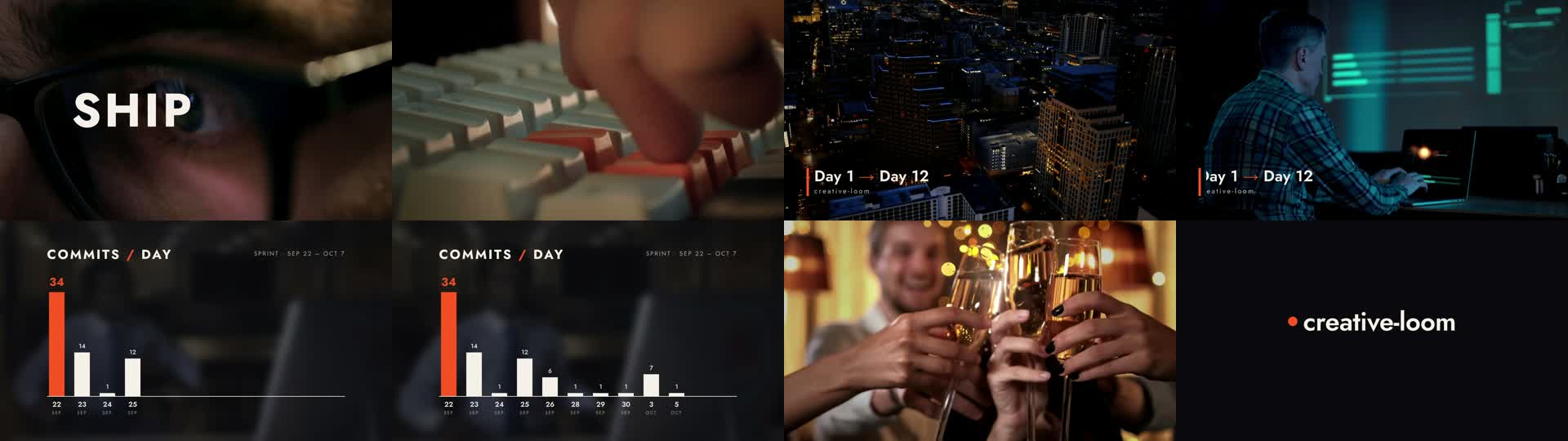
How
tools/gen.tswritesindex.htmlfrom the beat grid, cut list and CSV.- 13 clips, two designed transitions, and push-ins on several shots.
- Frame diffs were used to verify cuts, because the snapshot pass misses grade and timing bugs.
Friction
- The audio path cost 3 renders. A volume lane overrides
data-volumewithout saying so, and the true-peak guard reacted to a 20 ms AAC blip. - The grade isn't applied on a clip's first frame, so each clip starts one frame early, hidden.
- Rounding times to 4 decimals pushed one cut a frame late.
- Mixed grade: the whiteboard is bright and the champagne stays golden.
fframes 1.2.0
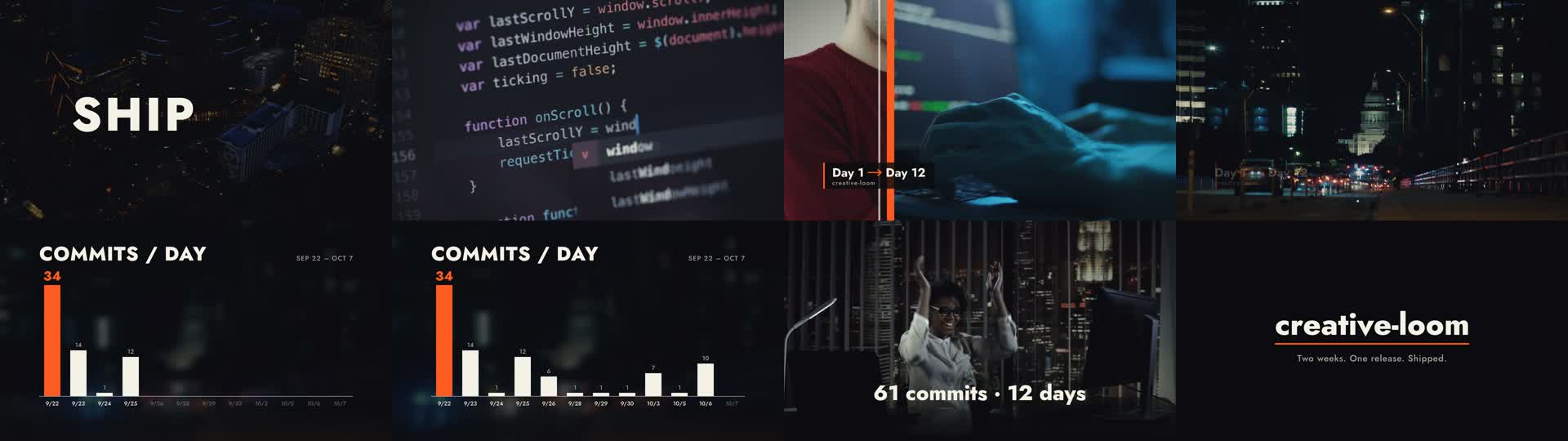
How
- Rust +
svgr!scenes on Skia/Metal, with ffmpeg linked in for encoding. - One SkSL shader handles reframing, push-in, blur, grade and dimming for every clip.
- The chart shows every day label dimly from the start and lights each one as its bar lands.
Friction
get_synced_video_framehas no source in-point. The agent cloned the frame and changed its index instead.- Scenes only cross-fade, so the wipe and whip were built by hand.
- It wouldn't link on Rust 1.89. The agent installed
nightly-2026-04-28and pinned it in the project. - Jost has no → glyph, so the arrow is drawn as a path. The default limiter left the true peak above −1 dBTP.
EffectCraft 0.3.1
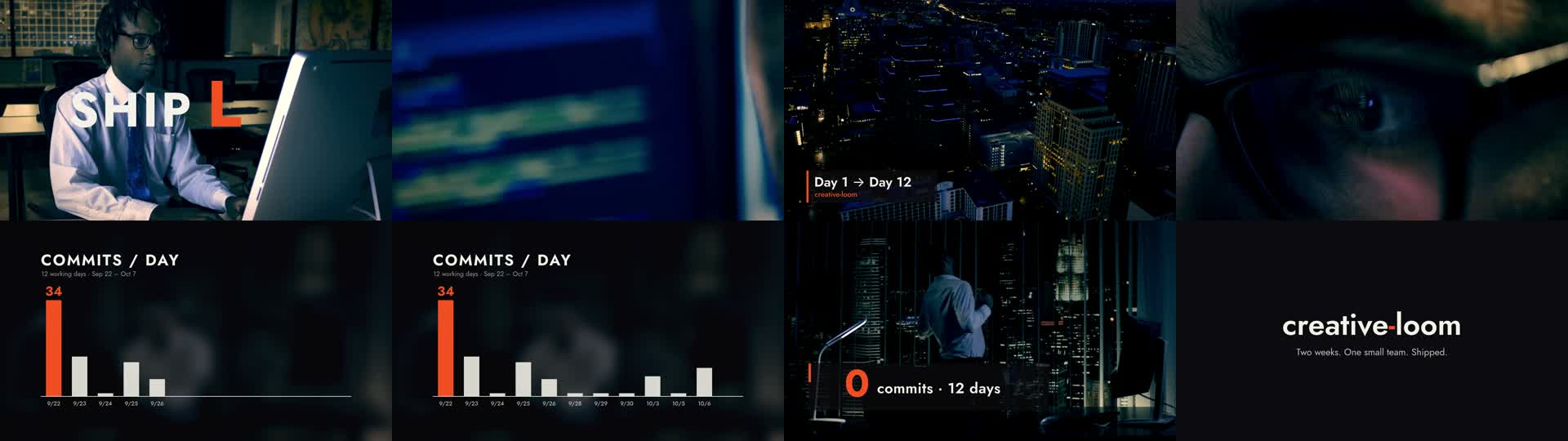
How
build.jsxbuilds the whole edit in an After Effects-style object model, saved asstudy.ecproj.- One adjustment layer grades all the footage, which gave the most consistent look of the four.
- Every detected cut is on a 15-frame beat, apart from the whip, which settles on its beat.
Friction
- Fonts load only from the system folders. The agent ran the tool with
HOME=$PWD/homeand put Jost in that folder'sLibrary/Fonts. style = "Bold"is accepted and ignored; the weight works throughlayer.setText.- There are no API docs, so property paths had to be found by probing.
- The synthesized music made the beat grid trivial. That's legal under the brief, but it dodges the hardest editing task.
Tesseract 0.3.1
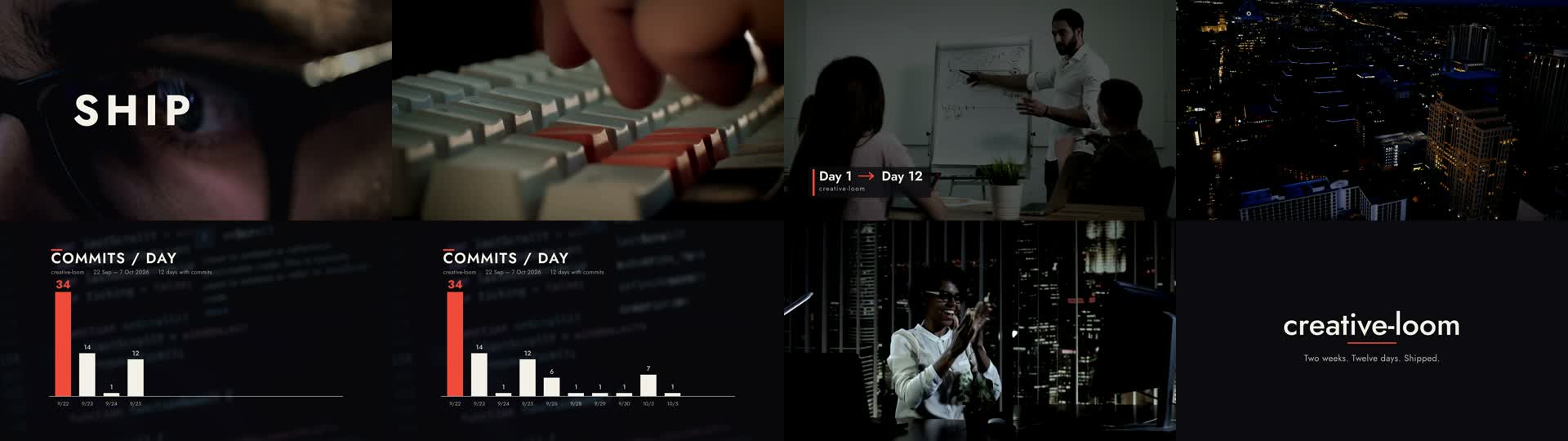
How
build.pywrites the native document, and the packagedship-log.tsrctstays editable.- A sliding matte with an accent edge and a whoosh reveals the whiteboard shot.
- The first render landed bars and letters one frame late; the second fixed it.
Friction
- Video layers draw at their own pixel size from the top-left corner, and "cover" doesn't fill, so each clip was centred and scaled by hand.
- How a clip's source in-point is stored isn't documented; the agent found it by running a trim on a scratch copy.
- The two schemas total about 800 KB, and required fields could only be found by grepping them.
- There are no groups, so the lower third was animated layer by layer.
Inputs
What each agent was told
Verbatim, with local paths shortened. Each run got the same subagent prompt with <tool> filled in, plus the brief and that tool's TOOL.md.
Subagent prompt (every run)
You are an editor and motion designer, working on your own from start to finish with no further input. Read cut-lab/BRIEF.md and cut-lab/runs/<tool>/TOOL.md, then build the piece in cut-lab/runs/<tool>/opus/ and write every deliverable there. Use only the assigned tool for the edit, graphics and mix, as the brief's rules say. Don't read or list anything else under experiments/cut-lab/runs/, and nothing under creative-loom-fx-lab/. Don't use the Creative Loom MCP tools or any paid generation. Make reasonable creative decisions yourself and keep going until out/final.mp4 exists and NOTES.md and SOURCES.md are written. Then reply with a short summary: beats done/approximate/impossible, renders, render time, and the biggest friction.
SHIP LOG brief: BRIEF.md
# SHIP LOG: a 20-second edited promo

You are the editor and motion designer. Cut a 20-second promo about one small software team's two-week sprint, built from real stock footage, a music track, and 2D motion graphics. Build it with the assigned tool (see "Rules"). There is no 3D in this study: it tests cutting footage to music, transitions, kinetic type, a data graphic, lower thirds, and the sound mix.

## Inputs (in `cut-lab/assets/`)

- `commits.csv`: 12 days of real commit counts (`day,commits`). Use these values exactly.
- `Jost.ttf`: a geometric sans you may use (or pick a better free font).

Everything else you source yourself:

- **Footage.** Find 6–12 real stock clips under a free license that allows reuse (for example Pexels, Pixabay, Mixkit, Coverr, Wikimedia Commons, or the Internet Archive). Pick shots that tell the story: late-night screens, hands on keyboards, whiteboards, a city at night, coffee, a launch/celebration moment. No AI-generated footage.
- **Music.** One instrumental track, 100–130 BPM, under a free license (or one you synthesize yourself). Find its beats and cut to them.
- Record every source URL and license in `SOURCES.md`.

## Spec

- 1920×1080, 30 fps, exactly 20.0 s (600 frames), stereo AAC music.
- Palette: near-black `#0b0b0f`, warm white `#f5f1e8`, one accent of your choice. Keep the footage graded consistently.

| Time | Beat |
|---|---|
| 0–2 s | Cold open: a single footage shot with a kinetic title, `SHIP LOG`, built letter by letter on the beat. |
| 2–9 s | Montage: at least 6 cuts, every cut on a beat of the music. At least one cut uses a designed transition (a wipe, a match cut, a whip, or a mask reveal), not only hard cuts. Footage is reframed/scaled to fill 16:9 without letterboxing; at least one shot has a slow push-in. |
| ~4–8 s | A lower third slides in over the footage: `Day 1 → Day 12` with a small subtitle, `creative-loom`. |
| 9–15 s | Data beat: the footage drops behind (blurred, darkened, or split-screen) while a 2D bar chart of `commits.csv` builds, one bar per beat, heights exactly proportional to the data. The tallest bar (34) is in the accent color with its value label. Day labels and a title, `COMMITS / DAY`, appear. |
| 15–18 s | Payoff: a fast run of 3–4 short cuts (the launch/celebration), ending on a held shot with a stat callout, `90 commits · 12 days`, that counts up. |
| 18–20 s | End card on `#0b0b0f`: `creative-loom` wordmark and a closing line of your choice. The music resolves or fades out cleanly by 20.0 s. |

Sound: the music should not clip (true peak ≤ −1 dBTP); aim for about −14 LUFS integrated. One or two sound effects (a whoosh on the transition, a hit on the stat) are welcome but optional.

Every cut and every bar lands on its beat, within one frame.

## Deliverables (in your run directory)

- `out/final.mp4`: H.264 yuv420p plus AAC, 1920×1080, 30 fps, 20 s.
- The source project or script that produced it (re-renderable), plus the downloaded media.
- `SOURCES.md`: every clip and the music, with URLs and licenses.
- `NOTES.md`, covering:
  - every beat, marked done, approximate, or impossible, with why;
  - your cut list (time in → time out, source clip and its in-point);
  - the number of renders, and render time per frame;
  - workarounds;
  - what was precise, and what fought you;
  - start and end times (run `date` at the start and at the end).

## Rules

- The editing (cuts, trims, reframing, transitions, timing), the motion graphics, the grade, and the audio placement must come from the assigned tool. Use `ffmpeg` only to download/transcode source media into a format the tool can read, to analyse audio, to mux audio if the tool cannot carry it, and to extract check frames. Don't pre-cut the edit in ffmpeg.
- Any helper language (Python, Bun, etc.) may be used for beat detection and data prep, not for rendering pixels.
- No paid generation (no AI video, image, music, or voice). Everything is sourced or built.
- Check your own work: extract frames at 1.0, 3.0, 5.5, 8.0, 11.0, 14.0, 16.5, and 19.0 s and look at them before calling it done. Listen-check the mix with numbers (loudness, true peak).
- Budget: about 60–90 minutes and 20 full renders at most. If a beat is impossible in your tool, say so and move on.
- Work only in your run directory. Don't read or list other directories under `runs/`.
TOOL.md: hyperframes
# Tool: HyperFrames (HTML compositions rendered to video)
CLI: `bunx hyperframes` (v0.8.140). Read the skills first: ~/.agents/skills/hyperframes/SKILL.md, then hyperframes-core, hyperframes-animation, hyperframes-keyframes (punch-ins, Ken Burns, transitions) and hyperframes-audio (mix). media-use covers footage cutting/reframing helpers; its HeyGen-backed `resolve` for music/SFX may not be signed in, so source music yourself if it fails. Footage and music go in the composition as `<video>`/`<audio>` elements (see hyperframes-core references).
TOOL.md: fframes
# Tool: fframes (Rust video framework: SVG scenes rendered on the GPU via Skia/Metal, ffmpeg encoding)
Read the skill first: cut-lab/.tools/fframes/skills/fframes-video/SKILL.md and its references (design.md, api.md, audio.md). The repo with examples is at cut-lab/.tools/fframes (see examples/ such as marketing, tiktok, motion-graphics). `cargo-fframes` is installed (`cargo fframes new <name> --format landscape --fps 30 --yes`); Rust is installed. Footage plays through `frame.get_synced_video_frame(...)`; music and SFX go in the audio map. Use the project CLI (`cargo run --release -- inspect | strip | frame | onion | audio analyze | render`) to check your work.
TOOL.md: effectcraft
# Tool: EffectCraft 0.3.1 (open-source After Effects clone in Rust)
CLI: cut-lab/.tools/effectcraft/effectcraft-cli (run with no args for usage; read cut-lab/.tools/effectcraft/README.md). The fastest path is `effectcraft-cli script build.jsx --save-as study.ecproj` with the After Effects-style object model (footage layers, precomps, masks, text animators, expressions, effects like Lumetri and Gaussian Blur), plus `render-frame` for checks and `render` for the movie. Known quirks: no function hoisting or String.substr in scripts; gradient colors must be set through `effectcraft-cli set ... colors '{"colors":[[0,"#hex"],...]}'`; keyframes snap to whole frames; footage passthrough is not bit-exact (slight softening), so don't fight it.
TOOL.md: tesseract
# Tool: Tesseract 0.3.1 by Mirage (native layer/composition engine, "the creative suite built for agents")
CLI: cut-lab/.tools/tesseract/bin/tesseract-0.3.1-darwin-arm64/bin/tsrct (run `--help`; telemetry is disabled; don't re-enable it).
Skills: read cut-lab/.tools/tesseract/skills/tesseract/skills/tesseract-motion/SKILL.md first and follow its references (installation, local-operation, native-authoring, motion-design, fx-authoring, motion, custom-shader). Pull exact fields from `tsrct project schema` and `tsrct project schema --document`. When the skill mentions an attribution variable, use TESSERACT_HOST=claude-code-lab.
Fonts must be imported from a TTF/OTF file; Jost is in the assets folder.
The take
Unlike round 2, every tool finished every beat. Editing and 2D motion graphics are within reach of all four, so what separates them is the friction an agent hits along the way. fframes rendered fastest by far; EffectCraft got to a finished cut first with the cleanest grade; Tesseract made the agent rediscover basic placement; HyperFrames lost most of its renders to audio that changed without telling anyone. A checklist brief also made the four cuts look alike, which is why round 4 threw the checklist out.
Frame counts, loudness, true peak and cut frames were measured on the final files. Players use 720p share copies. Footage and music: Mixkit, under the Mixkit free licenses.