In short
The verdicts
HyperFrames · WAVELENGTH
The widest range, the only real music, and a live HTML poster as a 3D texture. As in round 2, it's the one I'd pick.
EffectCraft · DIMENSIONS
The most After Effects-native: Card Dance on the kick, a Card Wipe into a lit 3D corridor, Shatter, Lightning. Loud and busy, but it has real moments.
fframes · DIMENSIONS
A disciplined ink, bone and vermillion palette and editorial type, in just two renders. Claude's pick from the stills.
Tesseract · FOUR DIMENSIONS
A true 4D hypercube in WGSL, wrapped in stock synthwave styling, with a flat line section.
Claude ranked these from contact sheets (a frame every 2.5 s) and put fframes first, HyperFrames second. Watched in motion with sound, HyperFrames won. Stills reward composition and palette; a reel lives on timing, music and movement.
Before you watch
Three of four made the same film. fframes, EffectCraft and Tesseract each independently built "DIMENSIONS": a point becomes a line, then a plane, then volume, then time or noise, then a title. Nothing in the brief mentions dimensions. It looks like Opus's default answer to "show range", and possibly a pull from the name Tesseract. Only HyperFrames broke away, with WAVELENGTH.
Three of four synthesized their own music. Only HyperFrames used a real licensed track, Kevin MacLeod's "Voxel Revolution". The synth tracks hit every accent but sound thin, and two agents said they never "heard" their mix and balanced it by meters alone.
At a glance
| fframes 1.2.0 | HyperFrames 0.8.140 | EffectCraft 0.3.1 | Tesseract 0.3.1 | |
|---|---|---|---|---|
| Concept | DIMENSIONS, after Klee's "a line is a dot that went for a walk" | WAVELENGTH, five frequencies | DIMENSIONS: point → noise | FOUR DIMENSIONS: point → hypercube |
| Length | 42.0 s | 43.3 s | 38.0 s | 38.5 s |
| Signature trick | a raymarched SkSL object with type composited behind it; a ridgeline drawn from the arp's FFT | a live HTML poster as a Three.js texture, with the camera diving through its "O" | kick-driven Card Dance, Card Wipe into a lit 3D corridor, Shatter | a WGSL shader drawing a true 4D hypercube |
| Music | synthesized stems + 30 SFX | ● Voxel Revolution (CC BY), filter sweep on the drop | synthesized stems; reverb, delay, EQ and compressor in-tool | synthesized stems + 10 SFX; no limiter in the tool |
| Loudness / true peak (measured) | −13.9 / −1.4 | −13.8 / −1.0 | −13.8 / −1.4 | −14.6 / −1.1 |
| Full renders | 2 | 12 | 4 (1 killed, out of memory) | 8 |
| Render time per frame | ~61 ms | 60–100 ms (1 worker) | ~210 ms | 29–80 ms |
| Wall clock | 26 min | 39 min | 46 min | 25 min |
| Biggest friction | shaders can't chain or read the SVG, so there's no post pass; variable font axes are ignored | GPU transitions blank any canvas; one WebGPU shader per page; the HTML texture only shows in a full render; filled the disk | memory: a 6000² 3D solid took about 10 GB per frame; menu indexing off by one; Shatter's simulation clock starts at source time 0 | groups render flat and run on the parent's clock; no limiter or compressor |
fframes · DIMENSIONS
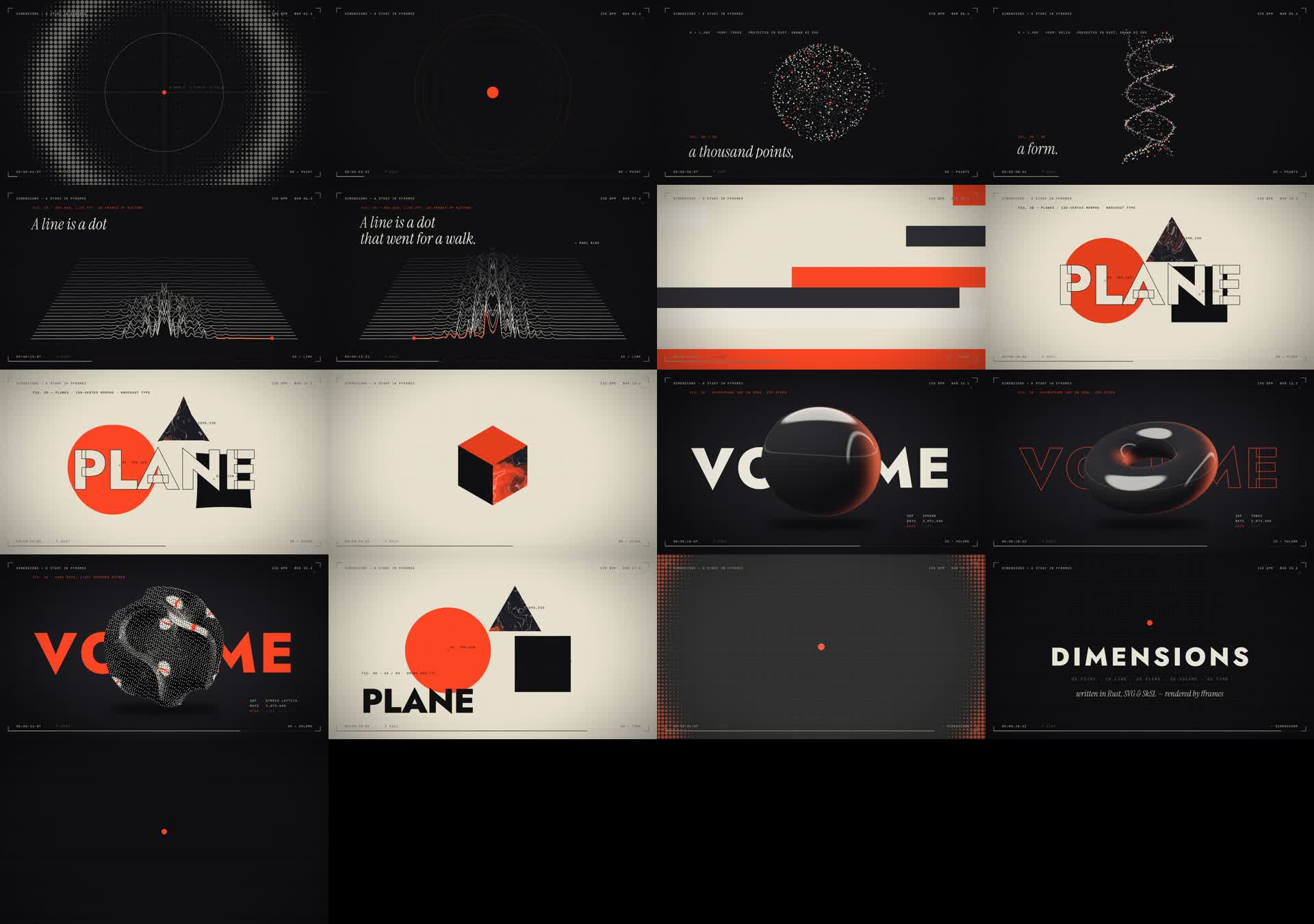
Shown
- 1,400 particles on per-point springs: sphere → torus → helix
- an FFT ridgeline from the real stem
- 120-vertex shape morphs with knockout type
- raymarched box → sphere → torus → lattice, with a 1-bit dither wipe
- halftone shockwave, band-tear glitch, grain
Self-critique
- the torus → helix morph is muddy for about 0.5 s
- the first 1.5 s are sparse
- the synth music isn't lush
- the master is 144 MB at CRF 16
Friction
- no shader chain or post pass
- static font weights had to be cut with fonttools
- the spectrum helper reads the wrong audio inside scenes
- it needs a Rust nightly; the project folder is 3.6 GB with build output
HyperFrames · WAVELENGTH
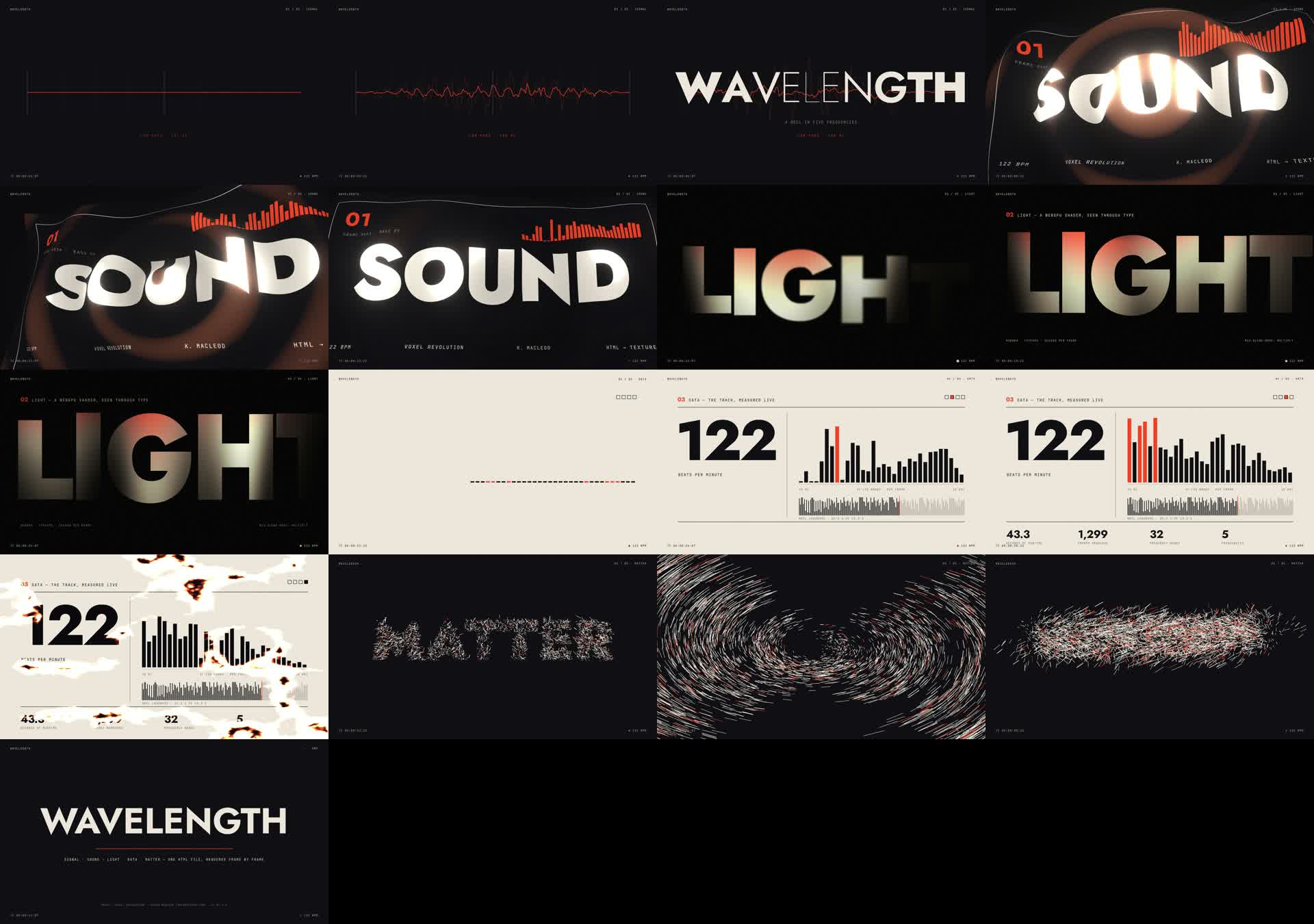
Shown
- a waveform oscilloscope and a variable-weight title wave
- an HTML poster → Three.js texture with bloom
- the registry Aurora WebGPU shader through type
- cinematic-zoom and ridged-burn shader transitions
- 4,200 particles with streaks; an in-tool filter sweep and reverb throw
Self-critique
- DATA is conventional and holds for about 7 s
- the ember rise reads as noise
- the aurora came out warmer than the palette
- no SFX
Friction
- shader transitions blank WebGL and WebGPU canvases
- a second registry shader renders black
- the texture capture fails in
snapshot - 4 renders spent on loudness; filled the disk until
hyperframes clean
Music: "Voxel Revolution" by Kevin MacLeod (incompetech.com), licensed under CC BY 4.0.
EffectCraft · DIMENSIONS
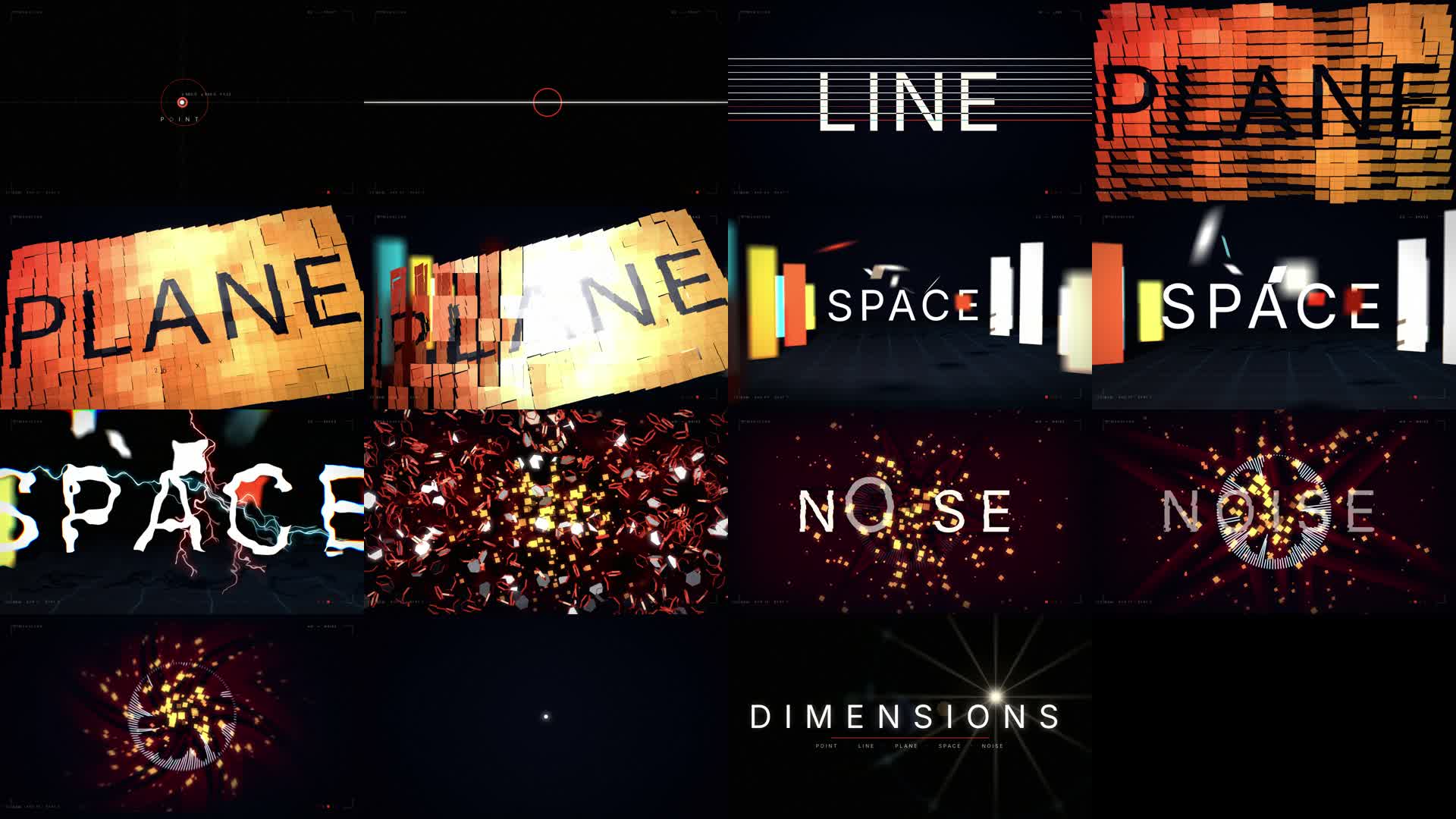
Shown
- Radio Waves, trim paths and repeaters
- Card Dance on Fractal Noise, driven by the kick (Convert Audio to Keyframes)
- Card Wipe into a 3D corridor: DoF camera, spot light with shadows
- Advanced Lightning, Shatter, CC Particle World, CC Kaleida, VR Digital Glitch
- Lumetri, Light Sweep, Lens Flare; a compressor on the music bus
Self-critique
- the 0–4 s opener is under-scaled
- 23–30 s stays one warm palette too long
- the plane scatters messily before it assembles
- the synth track isn't polished
Friction
- memory: up to 20 GB per frame, and the OS killed one render
- point parameters are in pixels from scripts
- menu values are 1-based in scripts but 0-based in the engine
- Audio Spectrum can't read a nested comp; effects on text clip to the text's bounds
Tesseract · FOUR DIMENSIONS
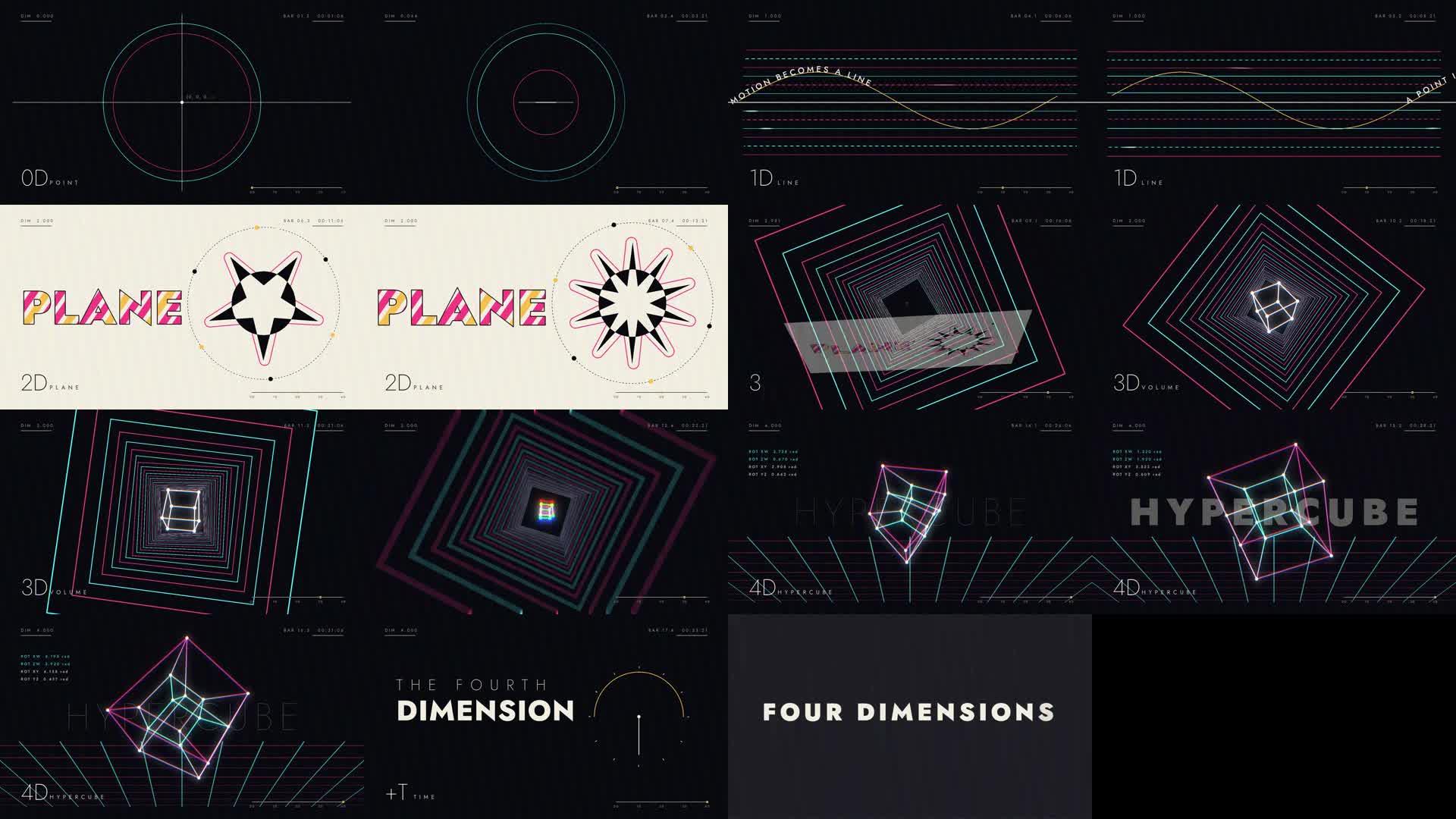
Shown
- a WGSL 4D hypercube with 4-plane rotation that unfolds from a plain cube
- text animators, variable weight, text on a path
- an alpha track matte; boolean star shapes
- 2.5D tunnel and plane tilt; composition motion blur
- glow, chromatic aberration and radial blur on the beat
Self-critique
- the 1D section (4–10 s) is flat
- 2D holds one layout for about 6 s
- the floor grid is stock synthwave; the HUD can't be read on a phone
- the ending is quiet
Friction
- depth inside groups is ignored
- a group's time mapping uses the parent's clock
- no limiter, so saturation was baked into the stems
- Motion Tile is bounded; the text-on-path guide isn't drawn
Inputs
What each agent was told
Verbatim, with local paths shortened. Each run got the same subagent prompt with <tool> filled in, plus the brief and that tool's TOOL.md.
Subagent prompt (every run)
You are a senior motion designer, working on your own from start to finish with no further input. Read cut-lab/reel/BRIEF.md and cut-lab/reel/runs/<tool>/TOOL.md, then make the reel in cut-lab/reel/runs/<tool>/opus/ and write every deliverable there. Spend real time exploring what the tool can do before you design: the goal is to show its best. Use only the assigned tool for visuals, motion and mix, as the brief's rules say. Don't read or list anything else under experiments/cut-lab/ (other than the brief, your TOOL.md, the assets folder and the tool paths it names), and nothing under creative-loom-fx-lab/. Don't use the Creative Loom MCP tools or any paid generation. Make your own creative decisions and keep going until out/reel.mp4 exists and NOTES.md and SOURCES.md are written. Then reply with a short summary: the concept, the techniques shown, renders and render time, the strongest and weakest moments, and the biggest friction.
REEL brief: reel/BRIEF.md
# REEL: show what this tool can really do

You've just been handed a motion-graphics tool, and a studio wants to know whether to adopt it. Make a **30–45 second professional motion-graphics reel** that shows off the best this tool can do. It should be the kind of piece a motion designer would put at the top of their portfolio, and it should make the studio say "I didn't know it could do that."

## What we want

- **Explore before you design.** Read the tool's docs, skills, examples, effect lists and registries properly. Find out what it is unusually good at: its native effects, shaders, text engine, particles, masks, expressions, compositing, audio and so on. Then build the reel around those strengths. A reel any tool could make is a failure.
- **Range and craft.** Aim for at least 6 distinct, clearly different techniques (for example kinetic type, shape morphs, masks and mattes, shader or generative work, particles, data viz, footage compositing, transitions, glitch and other textures, audio reactivity). Every section should look art-directed: a real palette, real typography, deliberate easing and spacing. Nothing should look like a template default.
- **It's one piece, not a slideshow.** Give it a concept or a through-line (a theme, a title, a visual idea) so the sections flow into one another with designed transitions, and cut it to music.
- **Music.** Use a track under a free license (Mixkit, Pixabay, Free Music Archive, incompetech and so on) or synthesize one yourself. Hit the music: the big moments should land on its beats and accents. Optional SFX are welcome.
- Stock footage is optional (free licenses only). You choose your own subject, title, palette and fonts. Free fonts are fine, and `Jost.ttf` is in this folder's `assets/` if you want it.

## Spec

- 1920×1080, 30 fps (or 60 if the tool shines there), 30–45 s, H.264 yuv420p + AAC.
- The mix must not clip: true peak ≤ −1 dBTP, around −14 LUFS.

## Deliverables (in your run directory)

- `out/reel.mp4`.
- The re-renderable source project or script, plus any media it uses.
- `SOURCES.md`: every outside asset, with its URL and license.
- `NOTES.md`, covering:
  - what you discovered about the tool while exploring, and which strengths you chose to showcase and why;
  - a section-by-section breakdown (time range, technique, how it was built in the tool);
  - things you wanted to do that the tool couldn't, or that fought you, and your workarounds;
  - your self-critique: what's strongest and what's weakest;
  - the number of full renders, render time per frame, and start and end times (run `date` at the start and at the end).

## Rules

- All visuals, motion, compositing and the audio mix come from the assigned tool. Use `ffmpeg` only to transcode inputs, analyse audio, mux if the tool can't carry audio, and extract frames. Helper scripts (Python, Bun and so on) may generate data or drive the tool, but they must not render pixels.
- No paid or AI generation (video, image, music or voice).
- **Review like a director.** Before calling it done, extract a contact sheet (a frame every 1.5 s) and look at it. Write down the three weakest moments, fix them, and render again. Do at least one full review-and-revise pass on taste, not only on correctness.
- Budget: up to about 2 hours and 25 full renders.
- Work only in your run directory. Don't read or list the other `runs/` directories or anything outside the paths you were given.
TOOL.md: fframes
# Tool: fframes (Rust video framework: SVG scenes rendered on the GPU via Skia/Metal, ffmpeg encoding)
Read the skill first: cut-lab/.tools/fframes/skills/fframes-video/SKILL.md and its references (design.md, api.md, audio.md). The repo with examples is at cut-lab/.tools/fframes (see examples/ such as marketing, tiktok, motion-graphics). `cargo-fframes` is installed (`cargo fframes new <name> --format landscape --fps 30 --yes`); Rust is installed. Footage plays through `frame.get_synced_video_frame(...)`; music and SFX go in the audio map. Use the project CLI (`cargo run --release -- inspect | strip | frame | onion | audio analyze | render`) to check your work.
TOOL.md: hyperframes
# Tool: HyperFrames (HTML compositions rendered to video)
CLI: `bunx hyperframes` (v0.8.140). Read the skills first: ~/.agents/skills/hyperframes/SKILL.md, then hyperframes-core, hyperframes-animation, hyperframes-keyframes (punch-ins, Ken Burns, transitions) and hyperframes-audio (mix). media-use covers footage cutting/reframing helpers; its HeyGen-backed `resolve` for music/SFX may not be signed in, so source music yourself if it fails. Footage and music go in the composition as `<video>`/`<audio>` elements (see hyperframes-core references).
The registry (hyperframes-registry skill, `bunx hyperframes catalog`) has ~400 blocks, components and effects; shader and runtime adapters (GSAP, Lottie, Three.js, TypeGPU, Canvas) are in hyperframes-animation.
TOOL.md: effectcraft
# Tool: EffectCraft 0.3.1 (open-source After Effects clone in Rust)
CLI: cut-lab/.tools/effectcraft/effectcraft-cli (run with no args for usage; read cut-lab/.tools/effectcraft/README.md). The fastest path is `effectcraft-cli script build.jsx --save-as study.ecproj` with the After Effects-style object model (footage layers, precomps, masks, text animators, expressions, effects like Lumetri and Gaussian Blur), plus `render-frame` for checks and `render` for the movie. Known quirks: no function hoisting or String.substr in scripts; gradient colors must be set through `effectcraft-cli set ... colors '{"colors":[[0,"#hex"],...]}'`; keyframes snap to whole frames; footage passthrough is not bit-exact (slight softening), so don't fight it.
TOOL.md: tesseract
# Tool: Tesseract 0.3.1 by Mirage (native layer/composition engine, "the creative suite built for agents")
CLI: cut-lab/.tools/tesseract/bin/tesseract-0.3.1-darwin-arm64/bin/tsrct (run `--help`; telemetry is disabled; don't re-enable it).
Skills: read cut-lab/.tools/tesseract/skills/tesseract/skills/tesseract-motion/SKILL.md first and follow its references (installation, local-operation, native-authoring, motion-design, fx-authoring, motion, custom-shader). Pull exact fields from `tsrct project schema` and `tsrct project schema --document`. When the skill mentions an attribution variable, use TESSERACT_HOST=claude-code-lab.
Fonts must be imported from a TTF/OTF file; Jost is in cut-lab/reel/assets.
The take
- An open brief separates the tools; a checklist doesn't. Round 3's checklist made the four look alike. Here each one's strengths show: fframes' design discipline, HyperFrames' web stack, EffectCraft's After Effects effects and Tesseract's shader route.
- HyperFrames wins again, and it's still the leakiest. It took 12 renders, and every advanced feature (canvas plus shader transitions, multiple WebGPU blocks, texture capture in snapshots) had a silent failure mode. The range is worth it.
- EffectCraft's After Effects vocabulary pays off. Card Dance, Card Wipe, Shatter and Lightning are effects an agent already knows how to drive, and they give it real moments, even if the whole is busy.
- fframes punches far above its documentation. Two renders and the cleanest stills: its inspect, strip and frame loop worked for an agent that can't watch video. In motion it was less of a standout than its contact sheet.
- Judging from stills isn't enough. The agents can't watch their own work, and Claude's ranking from contact sheets didn't survive watching the reels.
- Music is the weak link everywhere. Without a music source the agents synthesize, and it shows. Giving every tool the same licensed track would also make the beat-sync comparable.
- Concept collapse. Next round, give each run a different concept, or ban "dimensions".
Frame counts, loudness and true peak were measured on each final file. Players use 720p share copies of the 1080p masters.
All four